On this page
Hospital and Queue Operations
Queue System - Patient experience
The Queue System helps patients check in, receive queue information, and follow their progress through different healthcare service steps. Patients can access the queue through the Patient App or hospital Kiosk, depending on their situation.
1. Patient with a Booked Appointment
Patients who have already booked an appointment through the Patient App can check in when they arrive at the hospital and receive their queue number. They can then follow the queue process until they reach the required service. Patient App -> Appointment -> Check-in -> Queue Number -> Service
2. Patient without an Appointment
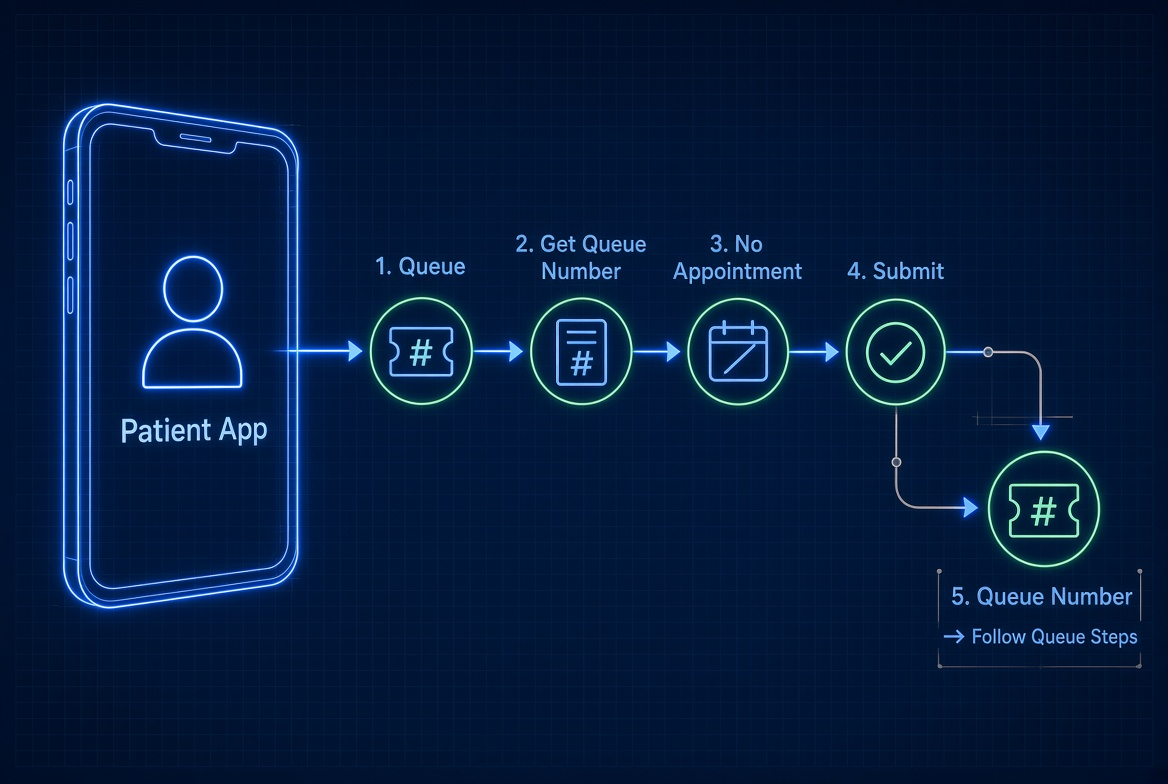
Patients who arrive without a previous appointment can use the Patient App to request a queue number. They can select the No Appointment option and join the available queue for their required service. Patient App -> Queue -> Get Queue Number -> No Appointment -> Queue
3. General Patient Using the Kiosk
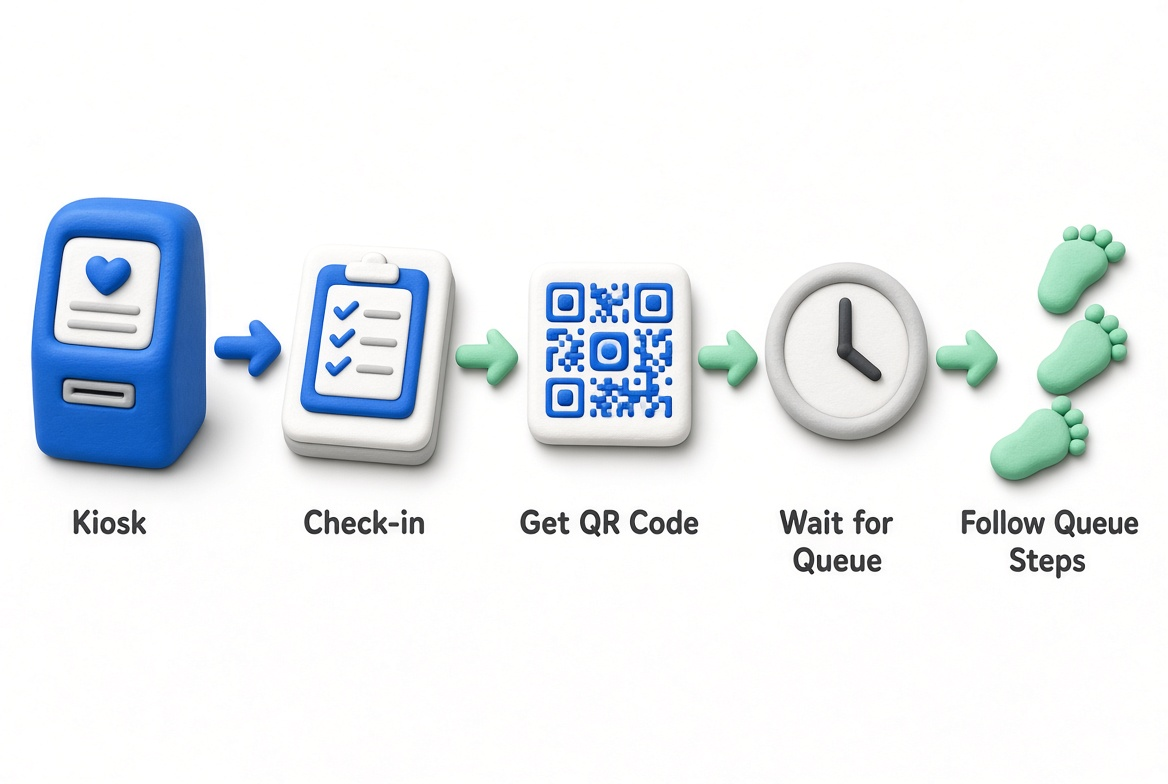
Patients who do not use the Patient App can use the Self-Service Kiosk at the hospital to check in and receive queue information or a QR code. They can then wait for their queue to be called and follow the required service steps. Kiosk -> Check-in -> Queue / QR Code -> Wait -> Service
4. Patient App and Kiosk
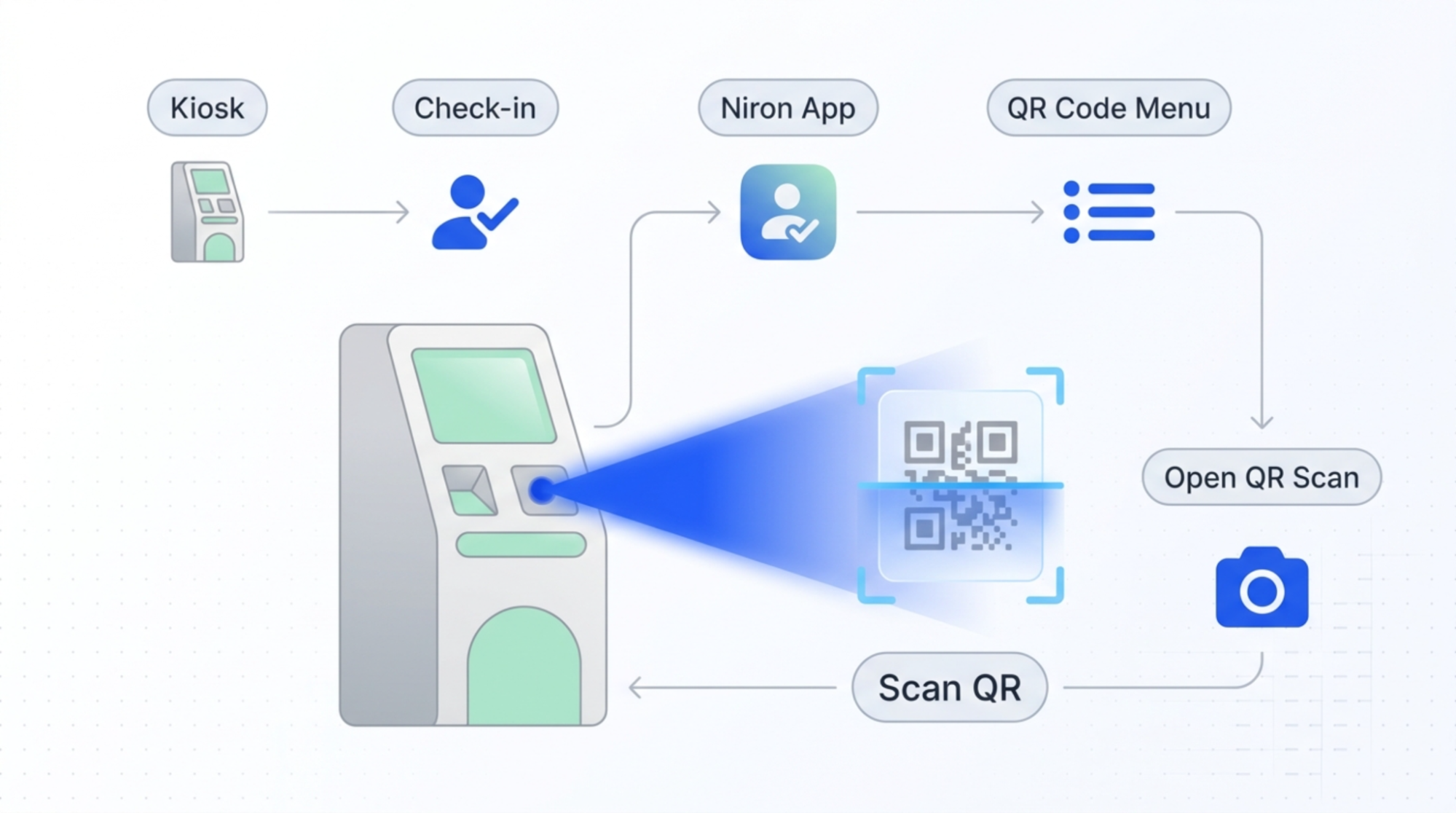
Patients who use the Patient App can also use the Kiosk. The Kiosk can provide a QR code that the patient scans through the Patient App to continue the queue process. Kiosk -> Niron App -> QR Code -> Patient App -> QR Scan -> Queue
5. OPD Registration
Patients going through OPD registration can also receive queue information or a QR code through the available registration and check-in process. The queue then supports their movement through the required OPD service steps. OPD Registration -> Queue / QR Code -> Service Steps
Queue Experience
The Queue System helps patients:
-
Easily check in and receive queue information.
-
Follow their progress through the healthcare service process.
-
Know when they are called for the next service.
-
Move through different service steps in an organized way.
-
Reduce unnecessary waiting and confusion.
-
Have a clearer and more convenient hospital experience.
Queue System - Staff experience
The Queue System helps hospitals organize patient flow from check-in and registration to consultation, laboratory, pharmacy, and other healthcare services. It connects patients and hospital staff through digital queue management, making it easier to follow each patient's progress and manage waiting times. The Queue System includes:
-
Self-Service Kiosk - Helps patients check in and get their queue information when they arrive at the hospital.
-
Queue Dashboard - Helps hospital staff manage patient queues and coordinate patient flow across different service steps.
-
Queue Display - Shows real-time queue information to help patients know when they are being called and where to go next.
-
Patient App Integration - Allows patients to check in, get queue information, and follow their queue journey through the Patient App.
-
Queue Management - Supports the movement of patients through different healthcare service steps in an organized way.
The Queue System helps create a more organized patient journey, improves visibility of the queue process, and supports more efficient healthcare service delivery.
Queue System - Product components
The Queue System supports hospitals in organizing patient flow from check-in and registration through waiting, consultation, and other healthcare services. It connects patients, hospital staff, and queue displays to provide a clear and organized waiting experience.
- Self-Service Kiosk
The Self-Service Kiosk provides patients with a convenient way to check in and access their queue information when they arrive at the hospital. It can provide a queue number or QR code and support patients in starting their service journey with less manual assistance.
- Queue Dashboard
The Queue Dashboard gives hospital staff a central place to manage patient queues and coordinate patient flow across different service steps. It helps staff see waiting patients, manage the queue, and move patients through the appropriate healthcare services.
- Queue Display
The Queue Display provides real-time queue information to patients in the hospital. It shows queue information and helps patients know when they are being called and where to go for their next service.
How the Components Work Together
The Queue System connects the main components to support a smoother patient journey: Patient -> Patient App / Kiosk -> Queue -> Staff Management -> Queue Display -> Next Service Together, these components help hospitals organize patient flow, make the waiting process easier to understand, and improve the overall patient experience.
Hospital Information System - Patient administration
The Hospital Admin Portal supports the management of patient information throughout the healthcare journey.
- Manage Patient Information
-
Manage patient personal, contact, registration, and visit information.
-
View and update patient details based on staff permissions.
- Manage Healthcare Records
-
Manage consultation notes, medical history, prescriptions, laboratory results, and diagnostic reports.
-
Keep healthcare information associated with the correct patient record.
- Manage Appointments and Visits
-
View patient appointments, visit details, assigned doctors, and service information.
-
Review previous and current patient visits.
- Role-Based Patient Access
-
Allow authorized staff to access patient information according to their role and permissions.
-
Provide relevant information to doctors, nurses, laboratory, pharmacy, and administrative staff.
- Follow Patient Healthcare Journey
-
Track patient information across different services and visits.
-
Connect records from registration, consultation, laboratory, diagnostics, pharmacy, and follow-up services.
- Maintain Patient Records
-
Update incorrect or changed patient information when required.
-
Keep patient records organized and available for authorized staff.
Patient Administration Benefits
-
Centralizes patient information.
-
Makes patient records easier to access and manage.
-
Supports continuity of care across departments.
-
Reduces reliance on separate manual records.
-
Helps staff work with accurate and organized patient information.
Hospital Information System - Clinical services
NironCare supports healthcare professionals in managing clinical services and patient care through connected digital workflows.
- Consultation
-
Support doctors in managing patient consultations.
-
Record and review relevant consultation information and clinical notes.
- Appointments
-
Manage patient appointments with doctors or healthcare services.
-
Provide appointment information for upcoming and completed visits.
- E-Prescribing
-
Allow doctors to create and manage digital prescriptions.
-
Make prescription information available to relevant pharmacy services.
- Laboratory Services
-
Support laboratory service requests and patient laboratory results.
-
Allow authorized staff to access relevant laboratory information.
- Diagnostic Services
-
Support diagnostic and imaging-related information.
-
Make relevant diagnostic reports available to authorized healthcare staff.
- Teleconsultation
-
Support remote consultations between doctors and patients.
-
Allow doctors to access appointment details and conduct digital consultations.
-
Clinical Services Benefits
-
Connects clinical services within one digital ecosystem.
-
Helps healthcare staff access relevant patient information.
-
Supports more organized clinical workflows.
-
Reduces reliance on manual clinical processes.
-
Improves coordination between healthcare services.
Hospital Information System - Hospital operations
The Hospital Admin Portal supports the daily operations of clinics and hospitals by organizing healthcare services, staff activities, and operational information in one system.
- Manage Daily Operations
-
Support daily hospital and clinic activities.
-
Manage information related to departments, services, staff, and patient activities.
- Coordinate Healthcare Services
-
Support the coordination of registration, consultation, laboratory, pharmacy, and other services.
-
Help staff manage patient flow between different service areas.
- Manage Staff Activities
-
Support role-based access and staff responsibilities.
-
Allow staff to perform tasks according to their assigned department and permissions.
- Manage Operational Information
-
Maintain organized information needed for daily hospital operations.
-
Provide access to relevant operational data for authorized staff.
- Reduce Manual Work
-
Centralize operational information in one platform.
-
Reduce paperwork and repetitive manual processes.
-
Help staff access and update information more efficiently.
-
Hospital Operations Benefits
-
Streamlines daily hospital activities.
-
Improves coordination between departments.
-
Reduces manual paperwork.
-
Helps staff manage healthcare services more efficiently.
-
Provides a more organized approach to hospital operations.